Online service book and apps
Your compressor tracked, from commissioning to every service
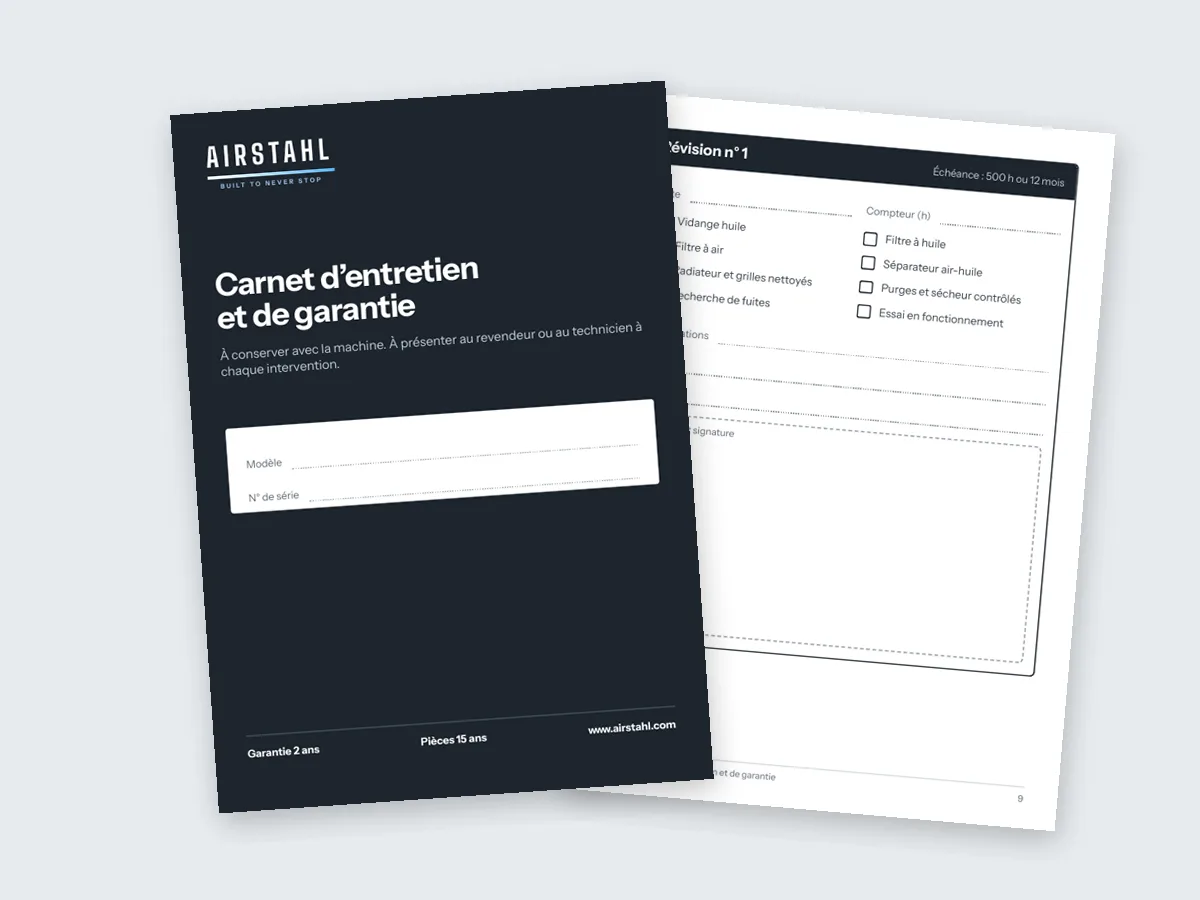
Every AIRSTAHL machine has its warranty and service book, on paper and online, linked to its serial number. The customer views it in the AIRSTAHL app, the dealer keeps it up to date in the dealer app. On computer and phone, in 8 languages.
The service book
A paper book, and an online copy that never gets lost
The pocket book still ships with the machine. Its online copy is linked to the serial number: it follows the machine for life, even if the paper book goes missing.
Linked to the serial number
The QR code next to the rating plate opens the machine's book directly.
Warranty activated by the dealer
At the sale, the dealer scans the machine, activates the warranty and links it to the customer's account.
Full history
Commissioning, services, replaced parts and call-outs are recorded with their date by the dealer.
Resale value
A complete book proves the maintenance: the warranty is kept and the machine sells for more.
For customers
The AIRSTAHL app: your service book and cases in your pocket
Free, at airstahl.com/app. Customers find their own machines there, and only theirs.
My service book
Each machine's book, read-only: warranty, commissioning, services and replaced parts.
Report a fault
A breakdown? The customer picks the machine, describes the problem and adds photos. Their dealer and AIRSTAHL are notified by email.
Ask for information
A question about a machine or a service, with photos if needed, from the same screen.
Track the case
Every request gets a number. The customer sees how it is progressing, with the replies and photos.
Our products
The full AIRSTAHL catalogue with specifications and data sheets.
AIRSTAHL Lab
The configurators and calculators: compressor, receiver, pipework, electricity cost, leaks.
Open the app Open My service book
Sign in with the customer code and password given by the dealer; the customer can then change the password. Scanning the QR code on the plate shows the machine's book, with no personal data; cases only appear once signed in.
A case tracked step by step
The customer, the dealer and AIRSTAHL see the same status, with its date. Every change is sent by email.
- Received
- In progress
- Awaiting your reply
- Awaiting parts
- Call-out scheduled
- Resolved
- Not covered
- Closed
The journey, from sale to service
Sale and activation
The dealer scans the machine, activates the warranty and links it to the customer code.
Customer access
The customer receives a customer code and password, then opens My service book on computer or phone.
A fault?
The customer reports it in the app with photos. A numbered case is opened.
Tracked handling
The dealer and AIRSTAHL move the case forward; the customer sees each step until it is closed.
Service recorded
Services and replaced parts are added to the book: the history stays with the machine.
For dealers
The dealer app and dealer area: everything entered in one place
The dealer keeps the book. They work from the dealer app on their phone or from the dealer area on a computer, with the same data.
Scan to activate
The dealer scans the QR code on the plate: the warranty is activated and the machine must be linked to a customer code.
Customer accounts
They create the customer's account and give them a password, which the customer can change later.
Book kept up to date
Commissioning, services and replaced parts are entered by the dealer. The customer views them.
Numbered, shared cases
Warranty, fault, sales support, question: every case is numbered and tracked by the customer, the dealer and AIRSTAHL.
History per machine
With the serial number, you find every request, ordered part, service and call-out.
My account and documents
Current orders, invoices and tracked quotes, plus data sheets for every machine, on computer and in the app. Dealers only.
The dealer app is downloaded from the dealer area, once signed in.
Everyone sees what concerns them
Customers see their machines
Only the machines linked to their customer code, their books and their own cases.
Dealer data stays private
Customers never see their dealer's prices, quotes, orders or invoices.
Entered once, by the dealer
The book is filled in by the dealer; the customer app is read-only, except for opening a case.
On computer, on phone, in your language
Both apps open in the browser, with no app store. On a phone, they can be added to the home screen like an app.
- PC, Mac, iPhone and Android, with the same data
- 8 languages: French, English, German, Spanish, Italian, Portuguese, Dutch, Arabic
- Nothing to install to view your service book

Frequently asked questions
Is the paper book still supplied?
Yes. Every AIRSTAHL compressor ships with its warranty and service book. The online book is its copy, linked to the serial number: it cannot get lost.
How does the customer view the service book?
At airstahl.com/app, "My service book" button, with the customer code and password given by the dealer. Scanning the QR code on the plate also opens the machine's book.
Do I need to install an app?
No. The app opens in the browser, on computer and phone. On a phone it can be added to the home screen, without going through an app store.
How do I report a breakdown?
In the app, "Report a fault": pick the machine, describe the problem and add photos. A numbered case is opened, your dealer and AIRSTAHL are notified, and you follow every step.
Can the customer see the dealer's prices or invoices?
No. The customer only sees their machines, their books and their own cases. The dealer's prices, quotes, orders and invoices stay in the dealer area.
How does the dealer activate the warranty?
In the dealer app, they scan the QR code on the plate, link the machine to the customer code and confirm. The customer receives their access and the book is opened.
Which languages are the apps in?
French, English, German, Spanish, Italian, Portuguese, Dutch and Arabic, like the website.
Do you sell or service compressors?
Join the AIRSTAHL network: the app, service books and shared cases are provided to our dealers.